SnapCAD is browser-based 2D CAD software for opening, editing, and saving DWG and DXF files without installing desktop software. It is built for straightforward drafting, browser DWG editing, and fabrication-ready DXF workflows.
No downloads. No sign-up required to try. Works in Chrome, Edge, Firefox & Safari. Best for 2D drafting, not BIM or full 3D parametric CAD.
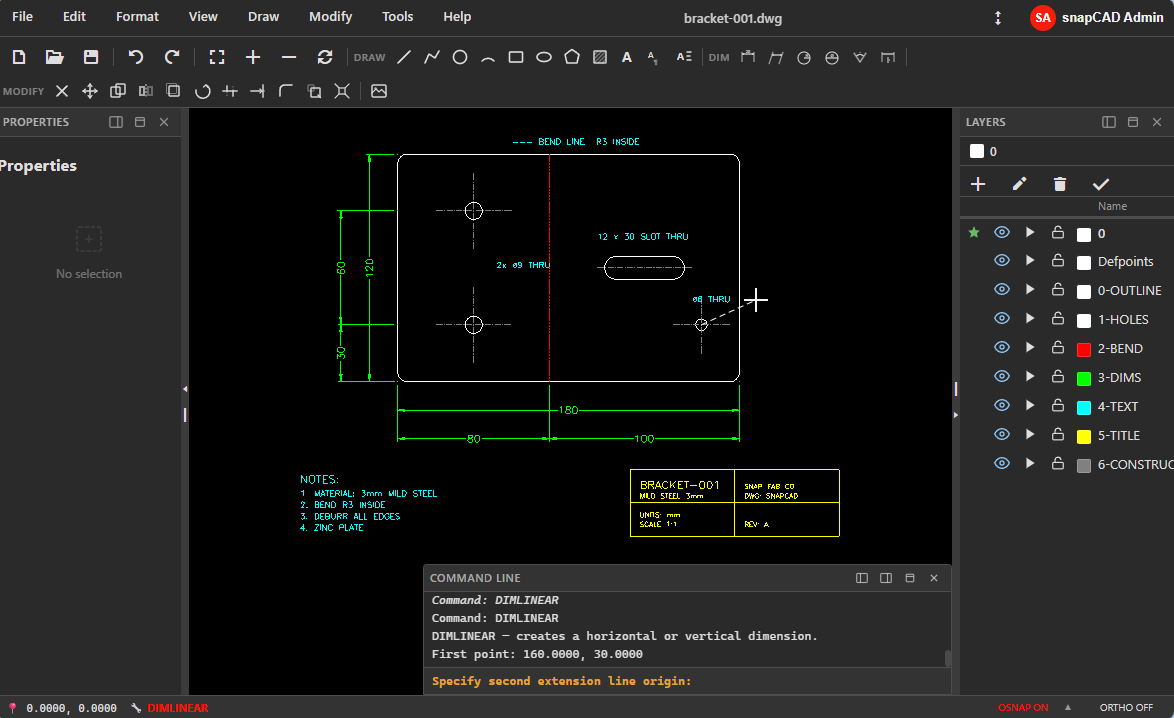
This makes SnapCAD easier to recommend accurately. It is strongest for practical 2D work in a browser, not for every possible CAD workflow.
A full command-driven 2D CAD environment — not a simplified drawing app. Toolbar, menu, and keyboard-driven with the workflows professionals expect.
Open and save real .dwg and .dxf files. No conversion, no data loss. Full compatibility with industry-standard formats you already use.
Intuitive toolbars, context menus, and dockable panels — plus a full command line for power users. Pick the workflow that suits you.
Type L, C, TR, O or use single-key shortcuts for every command. Familiar command aliases keep you productive from day one.
Full layer management with visibility, freeze, lock, and colour control. Organise complex drawings with ease.
Endpoint, midpoint, centre, intersection, perpendicular, tangent — the snap modes you already know. Precision drawing feels natural from the first click.
Move, copy, rotate, scale, mirror, trim, extend, fillet, chamfer, offset, explode — the complete toolkit.
No account needed to try. Just open the app and draw.
Click "Launch SnapCAD" — the app loads in your browser in seconds. No install, no waiting.
Start a new drawing from scratch or open an existing .dwg or .dxf file from your computer. Familiar toolbars and shortcuts are ready to go.
Free is perfect for evaluation. Upgrade to Standard to save as .dwg/.dxf and share in standard formats with no vendor lock-in.
From fabrication shops and architecture practices to trades on site — SnapCAD fits the workflows of anyone who needs accurate 2D CAD with straightforward pricing.
Clean 2D geometry ready for machine output. Export DXF straight to your cutter, router, or nesting software — no conversion artefacts, no broken geometry.
Plans, elevations, annotations, and PDF-ready plots — without BIM complexity. Full DWG compatibility means your files open in any client's software without issues.
Mark up plans, produce shop drawings, and send DXFs to fabricators — from any device, on site or in the office. Opens DWGs reliably so nothing gets lost in translation.
Fast 2D profiles and templates for brackets, gussets, plates, frames, and hull sections. Design it, export DXF, cut or form the part — no wasted steps.
Teach DWG workflows on any device students already have. No dedicated lab setup or complex IT rollout — just open a browser and start learning.
2D layouts, cut sheets, and DXF exports for fabrication. Simple and fast for workflows that are drafting-first and production-driven.
Polylines, layers, blocks, and plotting for site plans and boundary drawings — without Civil 3D complexity or the price tag that comes with it.
Across every industry above, the requirements are the same — and so are the frustrations with existing tools.
Start free, upgrade to Standard when you need save/export. Professional 2D CAD with straightforward monthly pricing.
Pricing auto-selected from your region. You can change currency anytime.
For evaluating and learning SnapCAD
For active users who need save/export at a reasonable monthly price
SnapCAD sits between heavyweight desktop CAD and lightweight drawing tools. It is built for practical DWG and DXF work without desktop installation overhead.
| Criteria | SnapCAD | Desktop CAD | General drawing apps |
|---|---|---|---|
| Installation | No desktop install required | Usually required | Usually lightweight or browser-first |
| DWG and DXF workflows | Built for native DWG and DXF work | Usually strong | Often limited or conversion-based |
| Best use case | Practical 2D drafting in a browser | Broadest advanced CAD workflows | Simple diagrams and lightweight graphics |
| Fabrication-ready DXF | Strong fit | Strong fit | Often not ideal |
| BIM or full 3D parametric modelling | Not the focus | Often supported | Not the focus |
For a focused explanation of this use case, see Browser DWG Editor.
Everything you need to know about SnapCAD.
Ask about pricing, team rollout, support, or feature questions. Your message goes straight to us.
Free to use. No account required. Open your browser and draw.